Overview
- Register as a Member: https://join.galactic-chess.com/wp-login.php?action=register
- Confirm Your Email, then receive your password.
- Connect and Play!
Ways To Connect
Chess Clients
- Check the “Use TLS/SSL” option
- Do NOT check “Use Timeseal” (timeseal is for non-encrypted connections)
- Use icsserver galactic-chess.com and icsport 5000
OpenSSL
openssl s_client -connect galactic-chess.com:5000
Netcat
ncat --ssl galactic-chess.com 5000
Socat
socat openssl-connect:galactic-chess.com:5000 stdioStunnel
sudo apt-get install stunnel4

# Configure stunnel (/etc/stunnel/stunnel.conf)
[galactic-chess]
client = yes
accept = 127.0.0.1:5555
connect = galactic-chess.com:5000

# Now telnet to local stunnel
telnet localhost 5555
WinBoard (+Stunnel)
Stunnel:
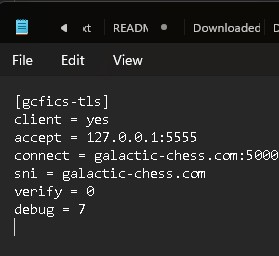
[gcfics-tls]
client = yes
accept = 127.0.0.1:5555
connect = galactic-chess.com:5000
sni = galactic-chess.com
verify = 0
debug = 7WinBoard:
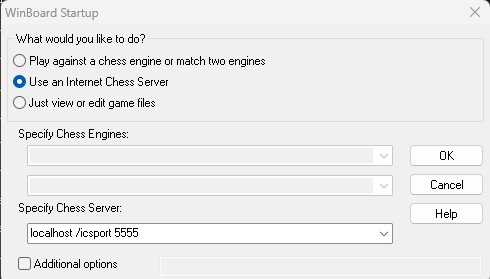
“Specify Chess Server:”
localhost /icsport 5555